Cross-site scripting (also known as XSS) is a web security vulnerability that allows an attacker to compromise the interactions that users have with a vulnerable application. It allows an attacker to circumvent the same origin policy, which is designed to segregate different websites from each other. Cross-site scripting vulnerabilities normally allow an attacker to masquerade as a victim user, to carry out any actions that the user is able to perform, and to access any of the user’s data. If the victim user has privileged access within the application, then the attacker might be able to gain full control over all of the application’s functionality and data.
How does XSS work?
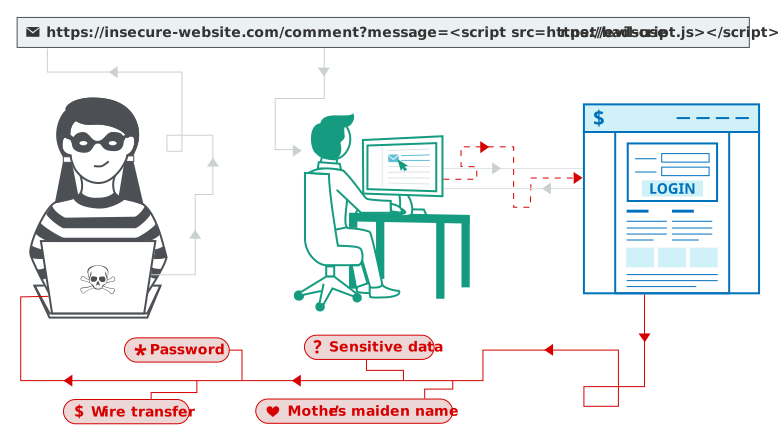
Cross-site scripting works by manipulating a vulnerable web site so that it returns malicious JavaScript to users. When the malicious code executes inside a victim’s browser, the attacker can fully compromise their interaction with the application.
XSS proof of concept
You can confirm most kinds of XSS vulnerability by injecting a payload that causes your own browser to execute some arbitrary JavaScript. It’s long been common practice to use the alert() function for this purpose because it’s short, harmless, and pretty hard to miss when it’s successfully called. In fact, you solve the majority of our XSS labs by invoking alert() in a simulated victim’s browser.
Unfortunately, there’s a slight hitch if you use Chrome. From version 92 onward (July 20th, 2021), cross-origin iframes are prevented from calling alert(). As these are used to construct some of the more advanced XSS attacks, you’ll sometimes need to use an alternative PoC payload. In this scenario, we recommend the print() function. If you’re interested in learning more about this change and why we like print(),
As the simulated victim in our labs uses Chrome, we’ve amended the affected labs so that they can also be solved using print(). We’ve indicated this in the instructions wherever relevant.
What are the types of XSS attacks?
There are three main types of XSS attacks. These are:
Reflected XSS, where the malicious script comes from the current HTTP request.
Stored XSS, where the malicious script comes from the website’s database.
DOM-based XSS, where the vulnerability exists in client-side code rather than server-side code.
Reflected cross-site scripting
Reflected XSS is the simplest variety of cross-site scripting. It arises when an application receives data in an HTTP request and includes that data within the immediate response in an unsafe way.
Here is a simple example of a reflected XSS vulnerability:
					https://insecure-website.com/status?message=All+is+well.
<p>Status: All is well.</p>
The application doesn’t perform any other processing of the data, so an attacker can easily construct an attack like this:
					https://insecure-website.com/status?message=<script>/*+Bad+stuff+here...+*/</script>
<p>Status: <script>/* Bad stuff here... */</script></p>
If the user visits the URL constructed by the attacker, then the attacker’s script executes in the user’s browser, in the context of that user’s session with the application. At that point, the script can carry out any action, and retrieve any data, to which the user has access.
Stored XSS (also known as persistent or second-order XSS) arises when an application receives data from an untrusted source and includes that data within its later HTTP responses in an unsafe way.
The data in question might be submitted to the application via HTTP requests; for example, comments on a blog post, user nicknames in a chat room, or contact details on a customer order. In other cases, the data might arrive from other untrusted sources; for example, a webmail application displaying messages received over SMTP, a marketing application displaying social media posts, or a network monitoring application displaying packet data from network traffic.
Here is a simple example of a stored XSS vulnerability. A message board application lets users submit messages, which are displayed to other users:
<p>Hello, this is my message!</p>
The application doesn’t perform any other processing of the data, so an attacker can easily send a message that attacks other users:
<p><script>/* Bad stuff here... */</script></p>
DOM-based cross-site scripting
DOM-based XSS (also known as DOM XSS) arises when an application contains some client-side JavaScript that processes data from an untrusted source in an unsafe way, usually by writing the data back to the DOM.
In the following example, an application uses some JavaScript to read the value from an input field and write that value to an element within the HTML:
					var search = document.getElementById('search').value;
var results = document.getElementById('results');
results.innerHTML = 'You searched for: ' + search;
If the attacker can control the value of the input field, they can easily construct a malicious value that causes their own script to execute:
You searched for: <img src=1 onerror='/* Bad stuff here... */'>
In a typical case, the input field would be populated from part of the HTTP request, such as a URL query string parameter, allowing the attacker to deliver an attack using a malicious URL, in the same manner as reflected XSS.